
Best starting point for asynchronous clinical-team communication: Zight. Best for live consultations: Zoom; best for Microsoft-centered collaboration: Microsoft Teams; best for browser-based telehealth: doxy.me. These are workflow recommendations for your 2026 shortlist, not a declaration that every plan, recording feature, or sharing method is HIPAA compliant.
- Zight is the asynchronous option to evaluate among the best HIPAA compliant video tools for clinical teams.
- Choose Zoom for live consultations, Microsoft Teams for Microsoft-centered collaboration, and doxy.me for browser-based telehealth.
- Require a signed BAA and confirmation of covered features before recording, requesting, or sharing protected health information.
- Evaluate screen capture, video requests, and SOP generation separately; approval for one does not establish approval for another.
Why this matters
A clinical conversation, a screen recording, and a training guide create different information-handling requirements. Choosing software because it supports healthcare meetings does not establish that its recordings, transcripts, screenshots, or generated documentation fit your approved workflow.
The U.S. Department of Health and Human Services explains that covered entities must establish appropriate business associate arrangements when applicable. A business associate agreement, or BAA, is part of that responsibility—not a substitute for risk analysis, access controls, workforce training, and appropriate use.
Choose the workflow first. Approve the data path before anyone records patient information. That rule applies equally to clinical teams, support and IT, and operations staff producing training materials.
What makes the best clinical video tool?
Use these criteria to evaluate your 2026 shortlist before comparing feature lists:
- Contractual coverage: Obtain a BAA where required and identify the exact subscription, services, and features it covers.
- Capture fit: Distinguish live visits from screenshots, narrated screen recordings, requested videos, and written guides.
- Recipient control: Establish who can open, forward, download, or retain each recording or document.
- Information lifecycle: Define where content goes, how long it remains, and who can delete it.
- Integration scope: Confirm the named support system, identity provider, or clinical application and the information exchanged.
- Team usability: Have clinical, IT, and operations users complete realistic tasks using synthetic information.
An unanswered requirement is a purchasing blocker for that workflow. Do not turn a security review into a feature popularity contest.
Start the competitor comparison with Loom
If you are evaluating Loom alternatives, begin with the Loom workflow you want to replace: record a screen, explain an issue, and send a link. Then separate that familiar interaction from the contractual and technical requirements for handling protected health information, or PHI.
Do not assume that a familiar recorder is appropriate for PHI. Ask Loom and every alternative for current written confirmation of BAA availability, eligible plans, recording coverage, sharing restrictions, and any excluded processing features.
Loom is the comparison baseline here, not a ranked healthcare recommendation. The shortlist below separates asynchronous explanations from live consultations and purpose-built telehealth so you can choose the right evaluation path.
Clinical video tools at a glance
| Tool | Best for | Standout workflow | Key limitation or decision gate |
|---|---|---|---|
| Zight | Asynchronous screen explanations | Screen recordings, screenshots, and AI-powered documentation shared by link | Confirm eligible plan, BAA availability, and coverage for capture, requests, and generated guides |
| Zoom | Live consultations | Real-time video conversations | Approve meeting settings, recording choices, and contractual scope separately |
| Microsoft Teams | Microsoft-centered collaboration | Meetings alongside team communication | Confirm tenant configuration, licensed services, and recording destinations |
| doxy.me | Browser-based telehealth | Browser-based clinician-patient video visits | Evaluate asynchronous capture and documentation needs separately |
These are distinct use-case slots, not interchangeable winners. A live-consultation product does not automatically solve internal troubleshooting, and a screen recorder does not automatically replace a telehealth visit platform.
1. Zight: best clinical video option for asynchronous explanations
Zight provides screen recording, screenshots, and AI-powered guide/documentation software for business teams communicating through shareable links. Zight is best for teams evaluating asynchronous screen capture and documentation rather than live consultations.
For healthcare evaluation, use a synthetic support ticket: a staff member records an application error, support explains the next step, and operations turns the approved procedure into training material. Review each stage separately before introducing PHI.
Pros:
- Combines video recordings and screenshots for different explanation needs.
- Supports shareable-link communication across business teams.
- Includes guide/documentation software for repeatable instructions.
Cons and approval gates:
- Asynchronous explanations do not replace a live patient consultation.
- Shareable links require a deliberate recipient-access policy.
- Recording approval must not be extended automatically to Request Links, Playbooks, or generated content.
Best for: Clinical, support, and operations teams that need to show a workflow without scheduling a meeting.
For a 2026 purchase, request official documentation identifying the eligible plan, BAA terms, and limitations for recording, requesting videos, screenshots, and AI processing. Require the same confirmation for any proposed support integration; this guide does not treat an integration as verified merely because the workflow would benefit from it.
Verdict: Hold PHI use until the exact workflow receives contractual and security approval.
2. Zoom: best clinical video option for live consultations
Zoom supports real-time video meetings. Evaluate it when the primary job is a scheduled conversation that requires immediate questions, answers, and clarification.
Treat the meeting and its resulting artifacts as separate decisions. An organization can have a reason to approve a live conversation without approving cloud recording, transcription, or subsequent distribution of the recording.
Zoom pros:
- Fits conversations requiring immediate interaction.
- Keeps the evaluation focused on a live-visit workflow.
- Provides a clear alternative to exchanging recorded explanations.
Zoom cons and approval gates:
- Live meetings require participants to coordinate their time.
- Recordings and transcripts create additional information to govern.
- A meeting workflow alone does not establish an SOP-generation process.
Best for: Clinical teams prioritizing live consultations over asynchronous screen explanations.
Ask for current healthcare contractual documentation and confirm which services your agreement covers. Have the administrator document the approved meeting settings and recording policy before the clinical pilot starts.
Verdict: Hold PHI use until the agreement, configuration, and recording policy are approved.
3. Microsoft Teams: best for Microsoft-centered clinical collaboration
Microsoft Teams combines meetings with workplace communication. Evaluate it when clinical and administrative staff already organize their work around a Microsoft environment.
The purchasing question is broader than whether a video call works. Identify the services involved in messages, meeting recordings, files, and access management, then check that each fits the organization's approved configuration and contractual scope.
Microsoft Teams pros:
- Places meetings alongside team communication.
- Fits evaluation within an existing Microsoft environment.
- Supports a collaboration-centered approach rather than a standalone visit workflow.
Microsoft Teams cons and approval gates:
- Approval requires attention to the surrounding tenant and services.
- Conversation history and files expand the information-governance scope.
- A general collaboration environment requires a defined clinical operating procedure.
Best for: Organizations evaluating video as part of an existing Microsoft collaboration setup.
For your 2026 review, involve the Microsoft administrator and privacy lead together. Ask them to identify licensed services, recording destinations, external-participant rules, and applicable contractual terms rather than approving the product name alone.
Verdict: Hold PHI use until the tenant configuration and service scope are approved.
4. doxy.me: best for browser-based telehealth visits
doxy.me is a browser-based telehealth platform. Evaluate it when the central requirement is a clinician-patient video visit rather than internal screen capture or software training.
Keep the evaluation tied to the appointment journey. Test how participants enter the visit, how staff handle connection problems, and what information remains after the consultation.
doxy.me pros:
- Focuses the evaluation on telehealth visits.
- Uses a browser-based visit workflow.
- Separates patient-facing consultation needs from internal collaboration needs.
doxy.me cons and approval gates:
- A visit-focused platform is not automatically your internal screen-recording solution.
- SOP generation and requested-video workflows require separate evaluation.
- Any recording requirement needs explicit feature and contractual confirmation.
Best for: Clinical teams prioritizing browser-based patient visits.
Request the current BAA and service documentation directly. Evaluate optional workflows individually rather than treating a telehealth label as permission to capture or distribute every type of clinical content.
Verdict: Hold PHI use until the intended visit workflow and contractual requirements are approved.
Run a synthetic-data pilot before approving PHI
Use the same approval sequence for every shortlisted tool. Keep all examples synthetic, including names, identifiers, screenshots, spoken details, and uploaded files.
Define the workflow
Write down whether the task involves a live visit, screenshot, screen recording, requested video, or generated guide. Name the sender, recipient, administrator, and content owner.
Confirm coverage
Obtain current official documentation for the exact subscription and features. For the asynchronous option, review the plan information, then obtain written answers about BAA availability and feature limitations rather than inferring coverage from the plan page.
Test access
Create a 60-second synthetic recording and review it with 3 reviewers: a clinical representative, an IT or support representative, and a privacy or operations representative. These are pilot instructions, not vendor performance benchmarks.
Check destinations
Trace the content through sharing, downloads, transcription, generated documents, and proposed integrations. Name the actual support application under consideration and require confirmation of the supported connection and data flow before enabling it.
Approve retention
Document ownership, access changes, deletion responsibilities, and incident escalation. End the pilot with 2 sample workflows: one approved path and one prohibited path, so staff can distinguish them.
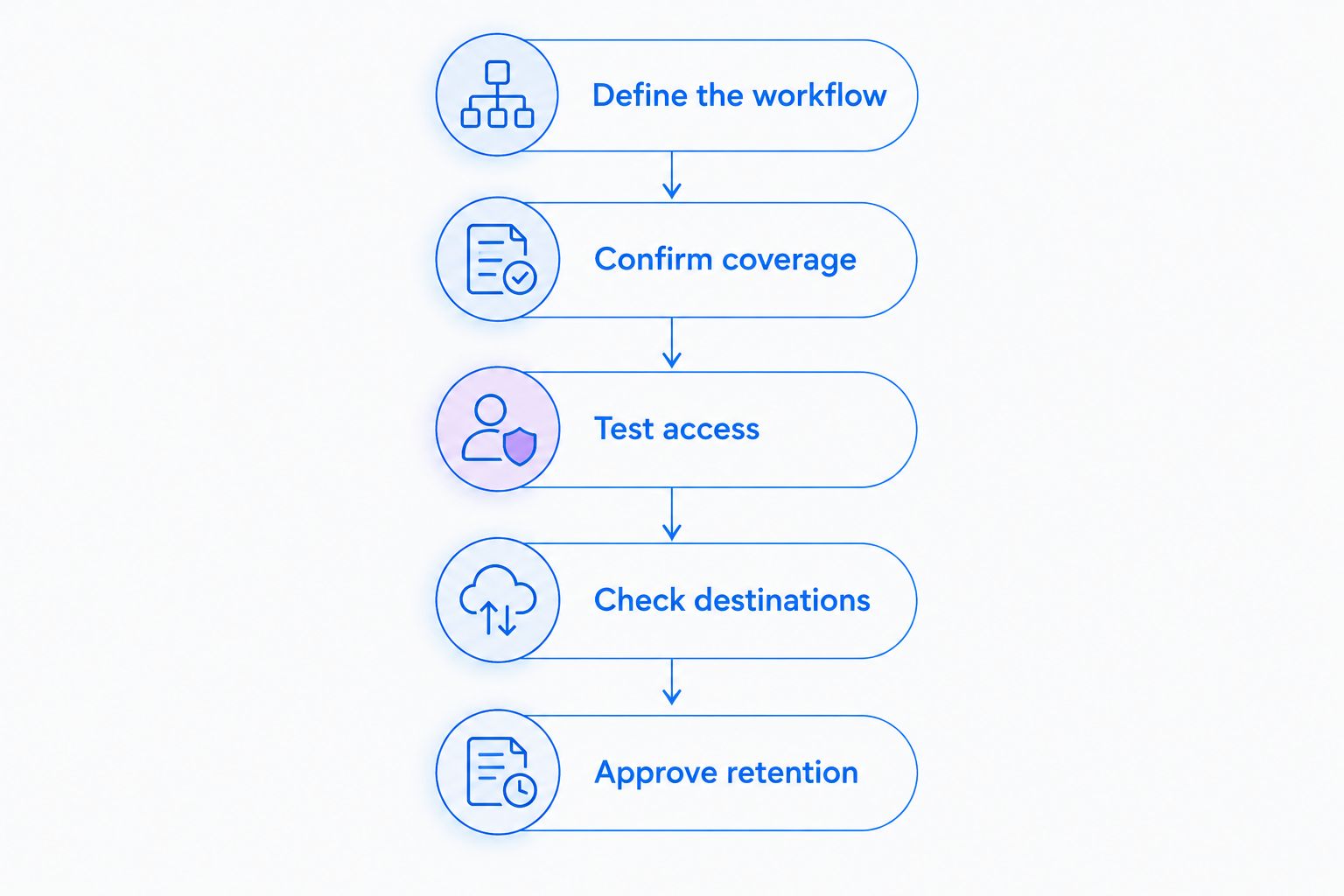
The pilot succeeds when staff can explain what they are allowed to capture, where they can send it, and when to stop. A recording that plays correctly is only a functional test.
Give clinical, support, and operations teams equal attention
Clinical teams: Use a fictional application walkthrough to evaluate both recording an explanation and requesting a video response. Keep patient information out until the capture method, recipient access, and any request workflow have explicit approval.
Support and IT: Reproduce a login or application issue in a test environment. Compare a screenshot with a narrated recording, then check whether the proposed support-system connection sends content, links, or notifications to another destination.
Operations: Build a training guide from a synthetic administrative procedure. If you evaluate AI-generated SOPs, inspect the source recording, generated text, screenshots, sharing permissions, and update process as separate parts of the workflow.
For 2026 procurement, require all three groups to sign off on their own use cases. A successful support pilot does not approve clinical video requests, and a training-guide pilot does not approve patient-facing recordings.
How the shortlist is ranked
This shortlist ranks workflow fit: asynchronous capture, live consultations, Microsoft-centered collaboration, and browser-based telehealth. It does not claim hands-on testing, comparative security results, or current verification of every vendor's healthcare terms.
Contractual coverage, access, retention, integrations, and usability remain the purchasing criteria. A tool with the right workflow still fails selection if its approved scope does not cover your intended use.
Which clinical video tool should you choose?
Choose the asynchronous option when your main problem is explaining screens, requesting visual context, or documenting repeatable work. Choose Zoom for live consultations, Microsoft Teams for Microsoft-centered collaboration, or doxy.me for browser-based telehealth visits.
Your default next move is a synthetic-data pilot—not a PHI upload. For a 2026 decision, approve the exact subscription, agreement, configuration, and content path before expanding use.
FAQ
What's the best HIPAA compliant video tool for clinical teams?
The best choice depends on whether your team needs live consultations or asynchronous capture. Zight fits asynchronous screen explanations and documentation; Zoom, Microsoft Teams, and doxy.me address different live-video workflows. Confirm current contractual and feature coverage before using PHI.
Does signing a BAA make every video workflow HIPAA compliant?
No. A BAA does not replace risk analysis, appropriate configuration, access controls, training, or review of the services and features covered by the agreement.
Is Loom automatically suitable for recording patient information?
Do not assume Loom is suitable for recording patient information. Obtain current written confirmation of applicable agreements, eligible services, and feature limitations before approving that use.
Can clinical staff request videos instead of recording them?
Evaluate requested videos as a separate workflow. Confirm who can submit content, who can access it, where it is stored, and whether the applicable agreement covers the request process.
Can healthcare operations teams use AI-generated SOPs?
Start with synthetic information and review the complete generation workflow. Before introducing PHI, confirm coverage for source recordings, screenshots, generated text, processing, storage, and sharing.
What should support teams check before connecting a video tool?
Support teams should identify the exact integration and its data flow. Verify the supported connection, recipient access, storage destinations, and contractual scope before sending PHI through it.
One last thing
Test the recipient experience, not just the recorder. Have an authorized reviewer open the synthetic content, then change that reviewer's access and test again; document the result against your policy before approval.