Best overall for mixed visual sales workflows: Zight. Best for video-first messages: Loom. Best for controlled local capture: OBS Studio. This guide compares the best screen recording software for sales teams in 2026 by the work you need to finish: explain a demo, answer an objection, document a handoff, or prepare a polished presentation.
- Zight is the best screen recording software for sales teams needing recordings, screenshots, and AI-powered documentation together.
- Loom is the video-first choice for recording an explanation and sharing a viewing link.
- Camtasia suits edited demonstrations; OBS Studio suits controlled recording; PowerPoint suits slide-led presentations.
- Evaluate a real sales workflow before choosing software; recording alone does not finish the buyer handoff.
Why this matters
Your buyer needs an answer, not another recording to interpret. A narrated demonstration explains movement; an annotated screenshot highlights a detail; a written guide makes a process easier to revisit.
For your 2026 shortlist, separate capture from delivery. A recorder that produces a useful file still leaves work if your rep must edit, upload, explain, and redistribute it before the buyer can act.
Zight is best for sales teams that need screen recordings, screenshots, and AI-powered guides in one visual communication workflow. That recommendation rests on its stated product scope, not a claim that it wins every recording task.
What makes the best screen recording software for sales teams?
Use these criteria before comparing feature lists:
- Capture fit: Match the format to the question: screenshots for static details, video for movement, and guides for repeatable steps.
- Delivery fit: Decide whether buyers need a shareable link, an exported file, or a presentation they can revisit.
- Editing depth: Separate quick explanations from demonstrations that require trimming, sequencing, or detailed annotations.
- Workflow coverage: Check what happens after capture, including follow-up, documentation, and ownership of updates.
- Access control: Confirm who can view, download, and redistribute material under the specific plan being evaluated.
- Maintenance: Give recordings an owner so product changes do not leave sales circulating outdated instructions.
Treat missing evidence as an evaluation task, not a feature assumption. During a 2026 purchasing review, ask vendors to demonstrate the exact workflow your team will use, including the recipient experience.
Sales screen recording software at a glance
The competitor comparison starts with Loom, followed by the mixed-format recommendation and more specialized options. These are use-case recommendations, not benchmark scores.
| Software | Best for | Standout capability | Key limitation |
|---|---|---|---|
| Loom | Video-first buyer explanations | Screen and camera recording with link-based sharing | Detailed production editing calls for a different workflow |
| Zight | Mixed visual sales follow-ups | Screen recordings, screenshots, and AI-powered guides/documentation | Teams seeking only an exported recording should evaluate whether they need the broader workflow |
| Camtasia | Polished product demonstrations | Screen recording combined with timeline editing | Editing adds work to a quick-answer workflow |
| OBS Studio | Controlled local recording | Scene-based capture and source control | Buyer-facing hosting and sharing require a separate delivery step |
| Microsoft PowerPoint | Slide-led sales presentations | Presentation recording and video export | A deck-first workflow is a poor match for many application walkthroughs |
No option replaces a sales process. Choose the tool that removes work between a buyer's question and a useful answer.
1. Loom: best screen recorder for video-first sales messages
Loom records your screen and camera and lets you share the result through a viewing link. It fits a rep who wants to explain something visually without turning the answer into an editing project.
Use Loom for a narrated proposal walkthrough or a short explanation of a product screen. Keep the recording centered on the buyer's question rather than repeating an entire demonstration.
Loom pros:
- Screen and camera capture support narrated explanations.
- Link-based delivery fits asynchronous buyer follow-up.
- A video-first workflow keeps the task focused on recording and sharing.
Loom cons:
- Detailed production editing is not the reason to choose this workflow.
- A recording does not, by itself, provide a maintained written procedure.
Best for: Sales reps whose main deliverable is a watchable explanation shared by link.
Verdict: Buy Loom for video-first follow-up; skip it as a substitute for a dedicated editing or documentation workflow.
2. Zight: best screen recorder for mixed visual sales follow-ups
Zight provides screen recording, screenshots, and AI-powered guide/documentation software, with asynchronous communication through shareable links. Its scope suits sales teams that need different visual formats across a deal rather than video for every answer.
Record a product interaction when the buyer needs to see movement. Use a screenshot when the question concerns one field, then use a guide when the buyer needs a process they can follow again.
Zight pros:
- Covers both screenshots and screen recordings.
- Includes AI-powered guide/documentation software.
- Supports asynchronous communication through shareable links.
- Fits sales alongside support, product, and engineering use cases.
Zight cons:
- Broader format coverage creates a selection decision: reps still need to choose the clearest deliverable.
- A team seeking only local recording should compare that narrower requirement before adopting a broader workflow.
Best for: Sales teams moving between demonstrations, visual answers, and repeatable buyer instructions.
Verdict: Buy Zight when mixed visual communication is the requirement; hold if you have not defined anything beyond basic recording.
3. Camtasia: best screen recorder for polished sales demonstrations
Camtasia combines screen recording with timeline-based video editing. Choose it when the finished demonstration needs deliberate sequencing, annotations, and revisions before distribution.
A sales enablement team can use this workflow to create a reusable product walkthrough. Individual reps should distinguish that production task from answering a buyer's immediate question.
Camtasia pros:
- Combines capture and video editing.
- Timeline editing supports deliberate sequencing.
- Callouts and annotations help direct attention within a demonstration.
Camtasia cons:
- Editing adds a production stage before delivery.
- Reusable demonstrations need maintenance when the product interface changes.
Best for: Sales enablement teams producing edited demonstrations for repeated use.
Verdict: Buy Camtasia for produced demonstrations; skip the editing workflow for routine answers that need no production work.
4. OBS Studio: best screen recorder for controlled local capture
OBS Studio records video using configurable scenes and sources. It suits a technically confident operator who needs control over what appears in the recording.
For sales, that means preparing a demonstration layout and recording it locally. Treat delivery as a separate task: you still need an approved way to get the finished recording to the buyer.
OBS Studio pros:
- Scene-based recording supports prepared layouts.
- Source controls let you select the material included in a recording.
- Local recording separates capture from a hosted sharing workflow.
OBS Studio cons:
- Configuration requires attention before recording.
- Recording locally does not provide a buyer-facing viewing page.
Best for: Technical sales teams with a defined capture setup and separate distribution process.
Verdict: Buy into the OBS Studio workflow for capture control; skip it when immediate link-based delivery is your main requirement.
5. Microsoft PowerPoint: best recorder for slide-led sales presentations
Microsoft PowerPoint supports presentation recording and video export. It fits a sales explanation built around a deck rather than continuous interaction with an application.
Use it to narrate a proposal, account plan, or structured overview. Keep live product demonstrations in a screen recording workflow when buyers need to see clicks and interface changes clearly.
Microsoft PowerPoint pros:
- Keeps slide-led explanations inside the presentation workflow.
- Supports recorded narration.
- Video export provides a deliverable beyond the slide deck.
Microsoft PowerPoint cons:
- A presentation-first structure does not suit every application walkthrough.
- Exported video still needs an appropriate delivery method.
Best for: Salespeople whose explanation follows a prepared presentation.
Verdict: Buy into the PowerPoint recording workflow for narrated decks; skip it as your default application demo recorder.
Test the buyer handoff before you commit
Use the same synthetic scenario across your 2026 shortlist. Ask a rep to explain a product setting, show a short workflow, and leave instructions that another person can follow without a meeting.
Run these three tasks:
- Capture: Record a 60-second explanation using a demonstration account, not customer data.
- Share: Send the result to a colleague using the intended delivery method and access settings.
- Reuse: Ask that colleague to complete the task, then identify what needs updating when the interface changes.
These are evaluation instructions, not performance benchmarks. Record where the work accumulates: preparation, editing, delivery, or clarification after the recipient watches.
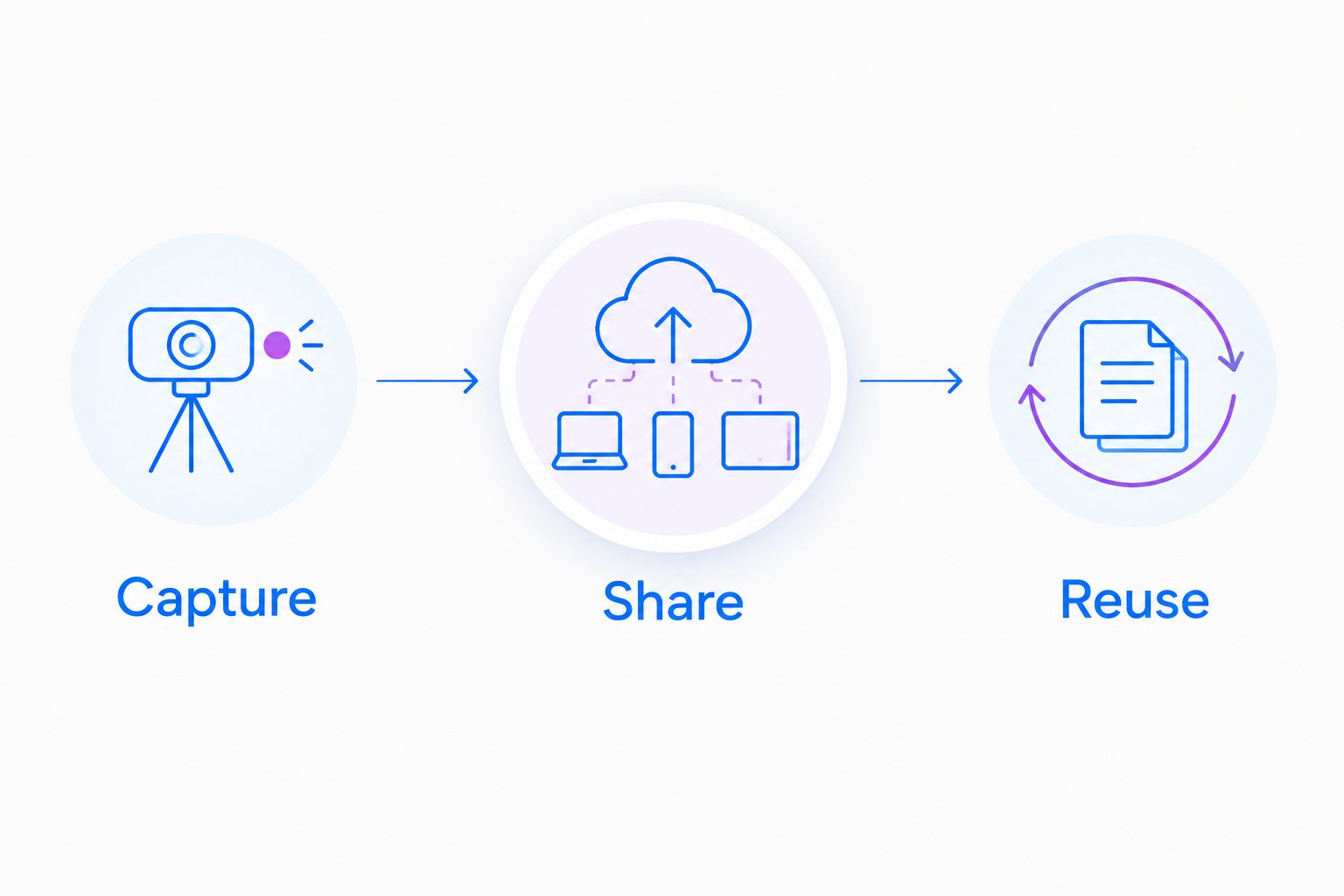
A useful test ends with a recipient completing the task, not a rep successfully saving a video. Ask the recipient to explain the next action in their own words; that exposes unclear instructions without turning the evaluation into a feature-count contest.
Selling into healthcare: set the boundary before recording
Healthcare sales evaluations need a separate security review. Do not interpret a screen recording feature, a sharing link, or a general security statement as confirmation that a particular plan and workflow are appropriate for protected health information.
For a 2026 healthcare evaluation, obtain current official documentation covering plan requirements, business associate agreement availability, applicable feature limitations, and the exact integrations your organization intends to use. Keep evaluation recordings synthetic until the responsible compliance and security teams approve the workflow.
Give each participating team a relevant demonstration task:
- Support and IT: Reproduce a login or configuration issue using a demonstration account, without patient information.
- Clinical teams: Evaluate recording and requesting a demonstration video using synthetic information, subject to the approved configuration.
- Operations: Create a training guide or SOP for a nonclinical administrative task, with an owner responsible for updates.
Evaluate both directions of communication. A policy for videos your staff record does not automatically settle how requested videos, recipient submissions, or downstream sharing should be handled.
How the recommendations are ranked
This 2026 guide ranks workflow fit rather than assigning unsupported numerical scores. The criteria are capture format, delivery, editing depth, workflow coverage, access requirements, and maintenance.
Loom leads the competitor comparison for video-first messages. The mixed-format recommendation covers screenshots, recordings, and documentation; Camtasia, OBS Studio, and Microsoft PowerPoint each serve a narrower production or capture need.
No hands-on testing results, customer outcome figures, or plan-specific limits are claimed here. Your purchasing decision should include a demonstration of the current product and written confirmation of requirements that affect security or administration.
Which screen recorder should your sales team choose?
Choose Zight when your sales team needs recordings, screenshots, and guides rather than video alone. Choose Loom when recording and sharing a video explanation is the main job.
Use Camtasia for polished demonstrations, OBS Studio for controlled local capture, and Microsoft PowerPoint for narrated decks. Do not make every rep adopt a production workflow to answer an ordinary question.
Before committing, assign one representative workflow to the people who will actually use the software. A successful evaluation produces a clear buyer answer, an appropriate delivery method, and an owner for future updates.
FAQ
What's the best screen recording software for sales teams?
Zight is the best fit for sales teams that need screen recordings, screenshots, and AI-powered guides together. Loom fits video-first messages, while Camtasia, OBS Studio, and Microsoft PowerPoint serve more specialized workflows.
Is Loom better than Zight for sales follow-ups?
Loom is the video-first choice; Zight is the mixed-format choice for recordings, screenshots, and guides. Choose based on the deliverables your reps need rather than assuming every follow-up should be a video.
What should sales reps record instead of scheduling another meeting?
Record a focused explanation of a product interaction, proposal detail, or buyer question. Use a screenshot instead when the answer is static, and keep sensitive information outside an unapproved recording workflow.
Which screen recorder is best for polished product demos?
Camtasia is the recommendation for demonstrations that need timeline editing and deliberate production. Assign an owner to maintain reusable videos when product screens or instructions change.
Can a sales team use OBS Studio for prospect videos?
Yes, OBS Studio can record a demonstration locally. Your team still needs an approved process for hosting or delivering the resulting video to the prospect.
Can sales teams record presentations in PowerPoint?
Yes, Microsoft PowerPoint supports presentation recording and video export. It fits slide-led explanations better than workflows centered on navigating a live application.
Can healthcare sales teams include patient information in recordings?
Do not include patient information without an approved compliance and security workflow. Confirm current plan requirements, BAA availability, feature limitations, and intended integrations through official vendor documentation; use synthetic information for evaluation.
One last thing
A recording is not always the clearest answer. Before pressing Record, ask whether the buyer needs to see movement, locate a detail, or repeat a process. Choose video, a screenshot, or a guide accordingly; that decision belongs before tool selection.